The Efficiency Engine: Scaling Road2Summit through Balanced Power and Cost

.png)
Co-author: Akash Yashwant Nimbalkar
The Problem That Follows Every Clean Architecture
Layer 2 established governance using Unity Catalog Lakebase and Delta tables, secured by a secret scope. While the foundation was solid, operational execution introduced complexity.
We needed scheduled pipelines, low-latency SQL for natural-language questions from website visitors, and automated telemetry ingestion from S3. Any standard platform would struggle with compute configuration, requiring manual oversight to manage cluster sizing, costs, and failures. With a small team on a 35-day journey, manual management was impossible.
That’s where Layer 3 comes in: Compute & Orchestration. This layer provided an automated engine to keep Road2Summit running, so the team could focus on other critical priorities rather than managing infrastructure.
The Architecture: Query, Transform, Orchestrate
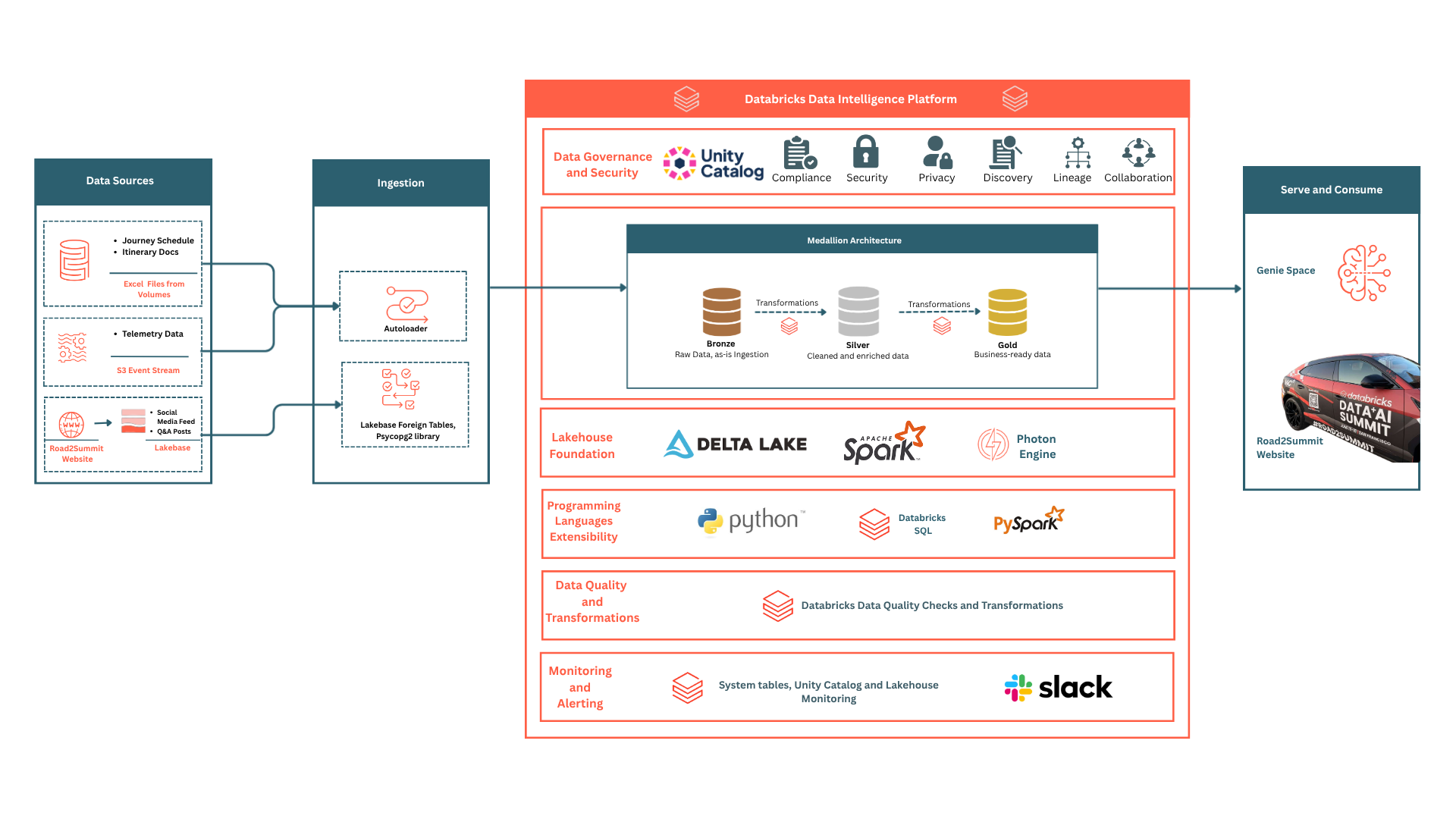
Road2Summit's compute layer had three distinct requirements:
Instead of using separate systems, we set up three unified configurations within one workspace. Managed through a single identity and service principal, they eliminated idle infrastructure by billing only for actual usage, providing a centralized point for monitoring and management.
SQL Warehouse: The Query Engine Behind Genie
Every time a visitor types a question into the Genie chat bar, 'Which city does the car reach today?' or 'How many posts mentioned #road2summit this week?', your request bypasses the standard Spark clusters typically configured for batch PySpark jobs, large dataset transformations, iterative ML training, or wide shuffle operations. It hits a SQL Warehouse: a query engine built specifically for SQL workloads.
This ensured low-latency performance for many concurrent users, removing the need for infrastructure management. Databricks provisions the compute, runs the query, and releases the resources. The first query after idle time still arrives in seconds, not minutes.
Permissions Needed for Genie
The Genie Space queries Delta tables on behalf of visitors, but executes them using our app's service principal identity. Before Genie could answer its first question, we had to explicitly grant the principal permission to use the warehouse.
-- Run once in Databricks SQL editor
-- Without this, Genie returns a permission error regardless of table grants
GRANT CAN_USE ON SQL WAREHOUSE `<warehouse-id>` TO `your-service-principal`;
Without this, Genie returns a permission error regardless of whether the principal has SELECT on the underlying tables. The warehouse grant and the table grants are separate concerns. You need both.
Key insight: A service principal needs CAN_USE on the SQL Warehouse and SELECT on each table it queries. These are two separate permission layers. Missing either one will break Genie.
Auto-Stop: The Detail That Saved Real Money
Our compute was configured with a 10-minute auto-stop period. During low-activity windows, such as nights and early mornings, no visitors ask Genie questions. Without auto-stop, the warehouse runs indefinitely, accumulating cost without serving a single query.
Auto-stop shuts the warehouse down after 10 minutes of inactivity and resumes automatically when the next query arrives, typically within 5 to 8 seconds. It is not enabled by default in Databricks and must be configured manually when creating the warehouse. For a 35-day campaign with 8 or more hours of inactivity each night, the difference was clearly reflected on the bill.
Serverless Compute: Run the Job, Not the Cluster
The journey schedule was stored in an Excel file. Before Genie could answer questions about it, that file needed to become a Delta table - cleaned, typed correctly, with event types classified. That meant running a PySpark transformation job on a file that only needed to be processed once.
We abandoned the traditional workflow: setting up a cluster, enduring a 3-to-5-minute startup delay, running the notebook, and risking unnecessary idle compute costs if manual shutdown was forgotten. This cycle, usually repeated for every scheduled task, was bypassed entirely.
How Serverless Jobs Work
With Databricks Serverless Compute, you submit a job notebook. Databricks allocates compute resources, runs the job, and deallocates them automatically when it finishes. Startup time is under 30 seconds. There is no running meter between jobs.
# Create a one-time ingest job via the Databricks SDK
# Omitting cluster config → Databricks runs this on Serverless Compute
from databricks.sdk import WorkspaceClient
from databricks.sdk.service import jobs

wc = WorkspaceClient()

job = wc.jobs.create(
    name="journey-schedule-ingest",
    tasks=[
        jobs.Task(
            task_key="ingest_schedule",
            notebook_task=jobs.NotebookTask(
                notebook_path="/Repos/your_repo/ingest_journey_schedule",
            ),
            # No new_cluster or job_cluster_key → serverless compute
        )
    ],
)

# Trigger the one-time run
wc.jobs.run_now(job_id=job.job_id)
We ran this job exactly once at the start of the journey. The notebook read the schedule Excel from a Unity Catalog Volume, ran the PySpark transformations, and wrote the result to the Delta table. Total wall-clock time: under 90 seconds. Total idle compute before and after: zero.
Key insight: Serverless Compute changes the economics of one-time jobs. A job that previously required a cluster to sit idle while you prepared the notebook now bills only for the duration of its execution. At any scale, there is no reason to provision a standing cluster for a job that runs once or twice a week.
Databricks Workflows: The Orchestration Backbone
A one-time ingest is the easy case. The harder problem is the pipelines that need to run on a schedule, reliably, for 35 days straight, with no one available to intervene when something goes wrong.
Road2Summit had two such pipelines, each feeding live data into the Delta tables that Genie queries:
- Telemetry pipeline: The Lamborghini's GPS coordinates and speed readings were archived to S3 by the Motive webhook handler while the car was moving. A scheduled workflow read those archived events and wrote them to a Delta table, keeping the Genie query layer up to date with the latest telemetry data.
- Social media mirror pipeline: The social monitoring service upserts posts into Lakebase every 30 minutes. A scheduled Workflow syncs the visible posts from Lakebase into a Delta mirror in our gold schema, so Genie has a fresh, governed copy of the publicly visible content.
Defining the Scheduled Sync Workflow
from databricks.sdk import WorkspaceClient
from databricks.sdk.service import jobs

wc = WorkspaceClient()

# Social posts Lakebase → Delta sync, every 30 minutes
wc.jobs.create(
    name="social-posts-delta-sync",
    schedule=jobs.CronSchedule(
        quartz_cron_expression="0 */30 * * * ?",
        timezone_id="America/New_York",
    ),
    tasks=[
        jobs.Task(
            task_key="sync_social_posts",
            notebook_task=jobs.NotebookTask(
                notebook_path="/Repos/your_repo/sync_social_posts_to_delta",
            ),
        )
    ],
    email_notifications=jobs.JobEmailNotifications(
        on_failure=["your-oncall@example.com"],
    ),
)
And the notebook calls to sync social posts to Delta tables:
from databricks.sdk import WorkspaceClient
from databricks.sdk.service import jobs

wc = WorkspaceClient()

# Social posts Lakebase → Delta sync, every 30 minutes
wc.jobs.create(
    name="social-posts-delta-sync",
    schedule=jobs.CronSchedule(
        quartz_cron_expression="0 */30 * * * ?",
        timezone_id="America/New_York",
    ),
    tasks=[
        jobs.Task(
            task_key="sync_social_posts",
            notebook_task=jobs.NotebookTask(
                notebook_path="/Repos/your_repo/sync_social_posts_to_delta",
            ),
        )
    ],
    email_notifications=jobs.JobEmailNotifications(
        on_failure=["your-oncall@example.com"],
    ),
)
And the notebook calls to sync social posts to Delta tables:

# sync_social_posts_to_delta - runs on Serverless Compute via Workflow
import psycopg2, pandas as pd
from pyspark.sql import SparkSession

spark = SparkSession.builder.getOrCreate()

conn = psycopg2.connect(
    host=LAKEBASE_HOST, database=LAKEBASE_DB,
    user=LAKEBASE_USER, password=LAKEBASE_PASSWORD,
    port=5432, sslmode="require"
)
df_pd = pd.read_sql(
    "SELECT * FROM social_posts WHERE is_visible = true", conn
)
conn.close()

df_spark = spark.createDataFrame(df_pd)
df_spark.write.format("delta").mode("overwrite") \
    .saveAsTable("your_catalog.gold.social_posts")
Key insight: mode='overwrite' is intentional and not a shortcut. The sync job replaces the mirror on each run, which means posts hidden in the admin dashboard disappear from Delta on the next sync. The mirror always reflects the current visible state of Lakebase, not an append-only snapshot that grows stale.
What Workflows Gave Us Beyond Scheduling
A cron job on EC2 can trigger a script on a schedule. But scheduling is the easy part. What it can't do:
- Retry on failure: if the Lakebase connection times out at 3 am, the job retries automatically. We configured two retries with a 5-minute gap to ensure the system could recover without any manual intervention.
- Run history: every execution is logged in the Workflows UI: start time, duration, exit status, and error output. Debugging a missed sync means clicking on the failed run and reading the stack trace.
- Email on failure - the sync jobs sent alerts to our on-call address. That single email_notifications config replaced an entire custom monitoring pipeline.
- DAG dependencies - if a downstream job needs the sync to complete first, Workflows handles that dependency declaratively. No shell scripts chaining commands together and hoping the upstream step succeeded.
For a 35-day campaign run by a small team, this operational reliability wasn't a nice-to-have. It was what made the entire campaign feasible.
How the Pieces Connect
Here's the end-to-end flow showing all three compute components working together:
- UC Volume (journey_schedule.xlsx) → Serverless Compute (one-time Workflow) → PySpark → your_catalog.gold.journey_schedule
- Motive telemetry → S3 archive → Serverless Compute (scheduled Workflow) → your_catalog.gold.telemetry_events
- Lakebase social_posts → Serverless Compute (scheduled Workflow, every 30 min) → your_catalog.gold.social_posts
- All three Delta tables → SQL Warehouse (Photon, auto-stop 10 min) → Genie NL→SQL → visitor answers
These are the three pipelines running on three different schedules. One SQL Warehouse endpoint with zero standing clusters or cluster management tasks.
Three pipelines. Three schedules. One SQL Warehouse endpoint. No standing clusters, no cluster management overhead.
Build Your Own Version: Four Patterns Worth Borrowing
Right-size compute per workload
Not every job needs the same compute profile. Use Serverless Compute for transformation jobs and one-time ingests; you pay for execution time, not cluster hours. Reserve the SQL Warehouse for your analytics and AI query layer - it's purpose-built for concurrent, short-running SQL.
Start with one warehouse; configure auto-stop first
A single Serverless SQL Warehouse with a 10-minute auto-stop handles most query loads at campaign scale. Don't provision multiple warehouses pre-emptively. Configure auto-stop before you go live, not after you see the first billing statement.
Workflows handle reliability.
Build scheduled jobs as Databricks Workflows rather than cron jobs or Lambda functions. The minimum viable setup that gives you retries and failure alerts:
email_notifications=jobs.JobEmailNotifications(
    on_failure=["your-oncall@example.com"],
),
# retries configured per Task via max_retries field
That two-field config is worth more than a custom monitoring pipeline built around a cron job.
Keep notebooks single-purpose
Each Workflow task should do one thing: read from a source, transform, write to a destination. Do not consolidate multiple pipeline steps into a single notebook. Focused notebooks are easier to debug, rerun independently, and update when the source schema changes.
Key Principles to Follow
- Time spent on cluster configuration, monitoring idle workers, and adjusting instance sizes distracted from actual data processing. Infrastructure management shouldn’t be the focus. By adopting Serverless Compute and Serverless SQL Warehouses, we effectively removed these operational burdens.
- Workflows provide operational visibility beyond simple pipelining. Initially, we didn't fully appreciate the importance of execution logs. However, when the social media data became outdated, the logs provided an immediate explanation: a 4:00 AM failure caused by a Lakebase timeout, followed by two automated retries and a final successful attempt.
- Auto-stop is a configuration decision, not a default. Since this feature is not pre-enabled, it must be activated before going live. On a campaign where the warehouse sits idle for 8+ hours each night, this configuration was vital for maintaining cost efficiency.
What's Next?
Now that the engine is running with data flowing, pipelines executing, queries serving in milliseconds, the natural question is what a visitor actually experiences on the other end.
Layer 4: Live Integrations answers that question. It explains how Databricks Genie, SQL Warehouse, and Delta tables across all three preceding layers work together to deliver immediate answers to natural-language queries from real-world users.
Key Takeaways
- By decoupling the analytics query layer from transformation tasks, Serverless SQL Warehouses provide an environment optimized for high-concurrency, low-latency SQL performance rather than batch PySpark processing.
- Deploying Genie requires specific permissions: CAN_USE for the SQL Warehouse and SELECT for individual tables; omitting either step results in ambiguous system failures.
- To prevent unnecessary expenses from idle resources, the 10-minute auto-stop feature must be explicitly configured before deployment, as it is inactive by default.
- Serverless Compute converts both recurring and isolated tasks into pay-as-you-go executions, removing the need for cluster setup and eliminating costs between active runs.
- Databricks Workflows offer significant operational advantages over standard cron jobs by integrating run histories, automated retries, and failure notifications.
- Over 35 days, three distinct pipelines operated autonomously with no manual oversight or permanent cluster infrastructure.
Recommended Reads
- Layer 1: Paving the Road2Summit: High-Speed Ingestion with Databricks
- Layer 2: Storage & Governance: Building the Unified Engine for Road2Summit
- Road2Summit Tech Stack
- Databricks Compute Overview
- Lakeflow Jobs: Scheduling and Orchestration
Ask Genie anything about the Road2Summit journey at road2summit.ai - it's running on exactly the stack described here.
More blog posts
.png)



.png)