Data Quality Checks Using DQX Engine


Introduction
The DQX implementation uses the Databricks DQX Engine to automate data quality across the Medallion Architecture, replacing a hardcoded, Test-Driven framework with a scalable, YAML-driven one. It guarantees that only high-quality data enters the Gold layer and isolates invalid records in a Quarantine layer for debugging by separating validation from transformation. This centralised method improves governance, audit visibility, and pipeline maintainability by supporting dynamic validation types, including uniqueness and range checks.
An Overview of the Implementation
This installation demonstrates how Databricks DQX Engine can be integrated into a Medallion Architecture pipeline to automate enterprise-level data quality validations.
The framework uses PySpark for scalable processing and Delta Lake for dependable storage. The entire validation process is coordinated by the Databricks DQX Engine, which dynamically applies rules using YAML-based validation configurations and JSON-based metadata management.
Prerequisites
The following tools and environment need to be set up before putting this data quality approach into practice:
- Databricks Workspace: An active Databricks environment where tables and schemas can be managed with Unity Catalogue enabled.
- The Databricks Labs DQX (Data Quality Expectations) library is accessible through the Databricks DQX Engine.
- Compute Cluster: A cluster that supports PySpark and Delta Lake that runs Databricks Runtime (ideally 13.3 LTS or higher).
- Python Libraries:
- databricks-sdk (for integration with WorkspaceClient).
- To parse the YAML-driven validation criteria, use pyyaml.
- Configuration Files: JSON metadata files and YAML validation rules are stored in a central repository (like DBFS or a Git-integrated folder).
Technical Background
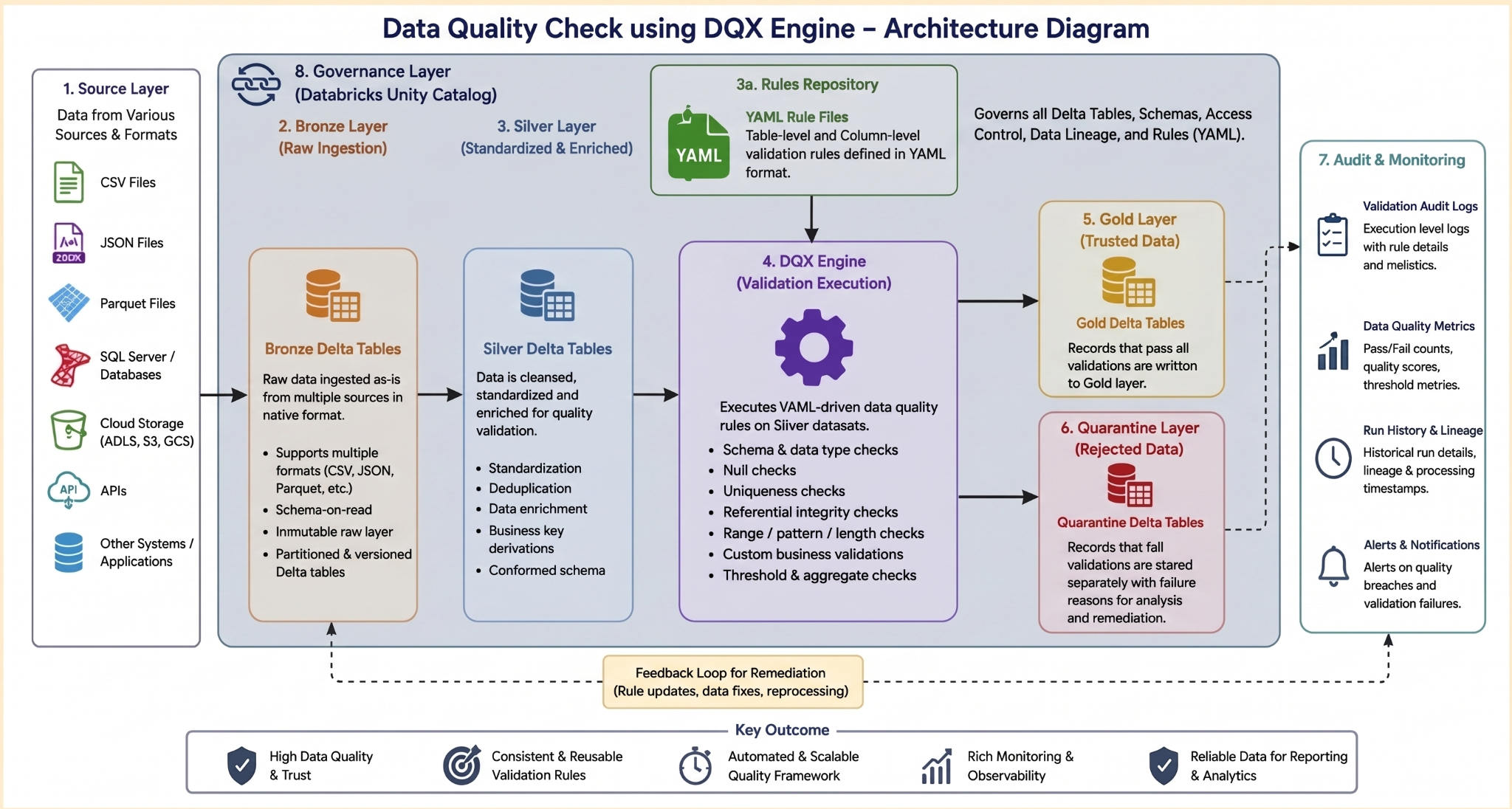
Each Medallion layer has a specific role in the solution's design, based on tiered data engineering principles.
The Bronze Layer: Manages the ingestion of raw data into Delta tables from various source systems.
The Silver Layer: Adds metadata, such as intake timestamps, to perform standardisation and enrichment.
The Gold Layer: Filters invalid records, applies DQX validation criteria, and publishes trusted datasets.
Extending validations for more datasets is simple because the entire system is configuration-driven.
Bronze Layer Implementation
The Bronze notebook handles the import of raw datasets into Delta tables.
The Bronze layer serves as the pipeline's immutable raw storage layer, ensuring that all data from various sources including cloud storage, enterprise systems, APIs, and formats such as CSV, JSON, and Parquet is successfully ingested into Delta tables.
Silver Layer Implementation
Data is standardized and prepared for quality validations using the Silver notebook. It utilises Bronze Delta tables to read and interpret data.
• Applies business transformation logic in accordance with use-case and business requirements.
• Schema Enforcement (Data Contracts): Utilizes Delta Lake’s native Schema Enforcement to block unauthorized structural changes. If a column is renamed upstream (e.g., user_email to email_address), the Silver write operation explicitly fails fast, preventing corrupt or partial data from reaching the Gold layer.
• Controlled Schema Evolution: Manages intentional schema changes strictly via mergeSchema options or explicit table alters, ensuring that the downstream DQX YAML configuration files are updated in lockstep.
• Unity Catalog Lineage: Automatically tracks end-to-end data lineage from Bronze to Silver via Unity Catalog system tables (system.access.table_lineage), providing audit visibility into schema dependencies.
• Validated Output: Produces curated Silver Delta tables optimized for downstream analytical processing and dynamic DQX engine evaluation.
Gold Layer Implementation
• Uses the DQX Engine to load YAML-driven validation rules dynamically.
• Carries out data quality validations, including range, null, uniqueness, regex, and business rule validations.
• Creates Gold tables and Quarantine tables for valid and invalid records, respectively.
• Gathers execution statistics, validation metrics, and audit logs for governance and monitoring.
Engine for DQX Validation
The Databricks Labs DQX Engine is included in the Gold notebook.
To handle the data quality lifecycle, the implementation entails setting up the DQEngine and integrating the WorkspaceClient. To ensure data integrity, this procedure involves importing predefined YAML rules and registering custom validation methods. The system maintains complete transparency through thorough audit recording while managing quarantine tables for non-compliant records to uphold high standards.
Config structure example:
{"catalog": "dqx_catalog",
"schemas": {
"bronze": "bronze", "silver": "silver", "gold": "gold"},
"tables": {"bronze": {"dqx-bronze-users": {"target_table": "dqx_bronze_users"}},
"silver": {"dqx-silver-users": {"source_table": "dqx_bronze_users", "target_table": "dqx_silver_users"}},
"gold": {"dqx-gold-users": {"source_table": "dqx_silver_users", "target_table": "dqx_gold_users"}}}}
The following snippet demonstrates how to annotate records with errors and warnings using the DQX Engine's metadata-driven approach:
source_table_users = f"{silver}.{config['tables']['gold']['dqx-gold-users']['source_table']}"
target_table_users = f"{gold}.{config['tables']['gold']['dqx-gold-users']['target_table']}"
# --- DQ: annotate Silver rows with _errors / _warnings ---
_source_df_users = spark.table(source_table_users)
_annotated_users = dq_engine.apply_checks_by_metadata(
    _source_df_users, dq_checks_all["users"],
    custom_check_functions=CUSTOM_CHECK_FUNCTIONS
)
Custom Validation Functions
To increase DQX's capabilities, several reusable custom validation routines were added:
- is_zero()
Verifies if numbers are exactly zero.
def is_zero(col_name: str):
    """Warn if numeric column value equals exactly 0. Null passes."""
    c = F.col(col_name)
    return make_condition(
        c.isNotNull() & (c == 0),
        f"Column '{col_name}' value is zero",
        f"{col_name}_is_zero"
    )
- is_nan()
Finds invalid NaN values in columns with numbers.
def is_nan(col_name: str):
    """Warn if DOUBLE column is NaN (not a number). Null passes."""
    c = F.col(col_name)
    return make_condition(
        c.isNotNull() & F.isnan(c),
        f"Column '{col_name}' is NaN",
        f"{col_name}_is_nan"
    )
- is_in_exclusive_range()
Verifies if numerical values are within permitted ranges.
def is_in_exclusive_range(col_name: str, min_val: float, max_val: float):
    """Warn if column value is NOT strictly inside (min_val, max_val). Null passes."""
    c = F.col(col_name)
    return make_condition(
        c.isNotNull() & ~((c >= min_val) & (c <= max_val)),
        f"Column '{col_name}' is not in exclusive range ({min_val}, {max_val})",
        f"{col_name}_out_of_range"
    )
Validation management across datasets is made easier by these reusable functions.
Commonly used Inbuilt DQX validation function:
YAML-Driven Validation Rules
The framework dynamically defines validation criteria using a YAML configuration file.
The YAML file serves as the only source of truth in this architecture. Using built-in DQX functions for standard integrity and custom Python functions for specialised business logic and criticality as error or warning, each check is defined by a column name and a particular function. It will be pushed to the quarantine table rather than the gold layer if the criticality is Error. It will push to the gold layer and the quarantine table if the criticality is Warn to determine the nature of the alarm.
YAML example for the is_unique function with criticality as error:
transaction:
  - name: transaction__id__unique
    criticality: error
    check:
      function: is_unique
      arguments:
        columns:
          - transaction_id
Criticality levels are used to classify validation rules:
- Error: Records are quarantined right away.
- Warning: Although records have been identified, processing may still proceed based on business needs.
Audit Logging & Quarantine Handling
To record execution statistics, the implementation keeps a special audit table.
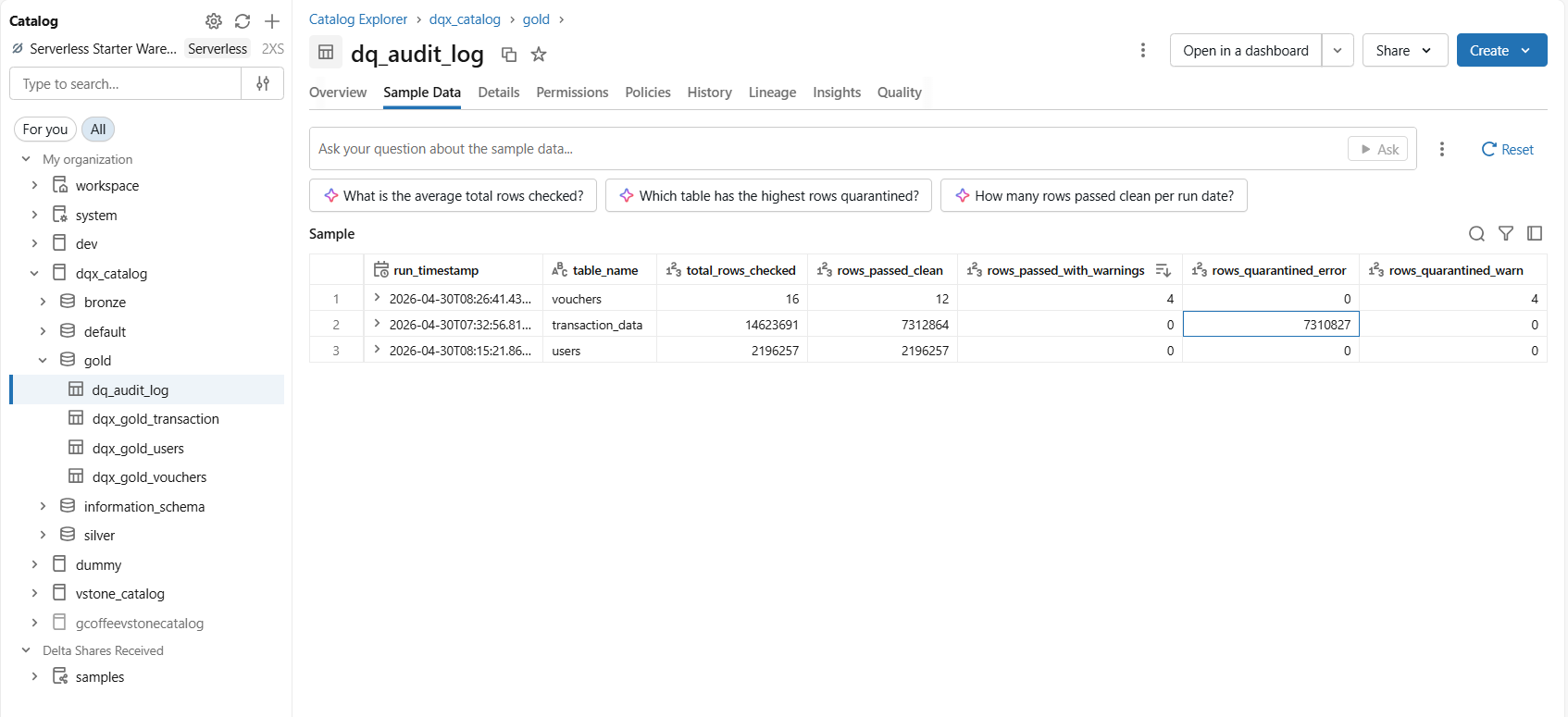
The metrics capture ensures full traceability by recording the run date, execution timestamp, and specific table name being processed. It monitors the data quality funnel by counting the total number of rows that have been verified, including those that have been successfully passed, those that have prompted warnings, and those that have been quarantined for further remediation.
Execution Workflow
To ensure that all processing is finished up to the Silver layer, the pipeline routine starts by accessing configuration files to construct dynamic schemas and catalogs. The system does thorough DQX checks on the Silver datasets after loading the YAML validation rules. While any unsuccessful entries are isolated in quarantine tables, verified data is then promoted to Gold tables. Audit metrics are recorded during this procedure to facilitate strong governance and ongoing oversight.
The Quarantine Layer: Operational Safeguards for Data Quality
To prevent contamination downstream, the quarantine layer isolates non-compliant records into dedicated Delta tables, serving as a crucial operational circuit breaker. The pipeline ensures that only high-integrity records reach the Gold layer by isolating faulty data at the validation boundary. Instead of causing the entire pipeline to fail, this isolation enables clean records to flow to analytics dashboards without interruption. Data engineers have a secure environment for troubleshooting, as defective records are kept with the failure reasons and information. A planned remediation workflow replaces reactive firefighting in data quality management, enabled by this structural isolation. In the end, it enables teams to adjust thresholds or resolve issues upstream without interfering with or tainting production statistics.
Advantages of the Solution
Through centralized rule management, the system provides a scalable, reusable validation framework that drastically minimizes hardcoding. This method uses quarantine datasets to speed up problem identification while improving data management and pipeline maintainability. In the end, these efficiencies lead to a significant increase in confidence across the reporting and analysis levels.
Known Limitations
• Workload Execution Overhead: Validating large volumes scales processing latency linearly with rule complexity. For instance, running 15+ column checks (e.g., is_unique, regex_match) on >100M records introduces a 15%-25% compute overhead compared to a standard straight-line append pipeline.
• YAML Maintenance Configuration Sprawl: Scaling a configuration-driven framework across vast enterprise landscapes creates management overhead. Manually maintaining 500+ distinct YAML files across separate business domains becomes highly complex and error-prone without automated CI/CD validation scripts.
How V4C.ai can help
Our practitioners at v4c.ai contribute extensive, practical production experience to each Databricks engagement. In order to keep your core pipelines scalable and lean, we specialise in integrating DQX by separating validation rules from YAML configurations. We assist corporate clients in automatically quarantining errors and maintaining complete auditability by integrating this framework into the Medallion Architecture. We provide the high-integrity frameworks that make your data genuinely trustworthy rather than merely deploying tools.
Roadmap for the Future & Conclusion
With the Databricks DQX Engine, this implementation provides a solid foundation for enterprise-grade data quality management.
Streaming Validation Strategy: The DQX Engine is optimized for batch pipelines. For low-latency streaming workloads, teams should utilize Delta Live Tables (DLT) Expectations for native, continuous runtime validation. Use DQX for decoupled, configuration-driven batch architectures, and DLT for streaming infrastructure.
Automated CI/CD Pipelines: Production changes use a Git-driven workflow. Modifying a validation YAML triggers a pull request that executes automated test validations against sample data in a staging environment to prevent schema drift and syntax errors before hitting an approval gate for main branch merges.
Proactive Operational Monitoring: Replaces manual reviews with native Databricks SQL Dashboards and Databricks Lakehouse Monitoring. These dashboards track statistical quality profiles by querying the dq_audit_log table directly, and using native Databricks SQL Alerts to trigger immediate Slack or email notifications when quarantined error thresholds are crossed.
All things considered, the project demonstrates how reusable and adaptable DQX validations can enhance scalability, governance, and reliability in contemporary cloud-based data platforms.
.png)