Scale Smarter: Standardizing Databricks Deployments with Code


Co Author : Shreya Santosh Auti
Introduction
As data engineering teams grow, managing Databricks tasks, notebooks, workflows, and settings across many environments becomes more difficult. Manual deployments, environment-specific changes, and configuration drift can slow down delivery and cause issues.
This problem is addressed by Declarative Automation Bundles (DABs, previously called Databricks Asset Bundles), which provide a straightforward, version-controlled way to bundle and deploy Databricks assets uniformly across environments.
Overview
Standardizing the definition, deployment, and management of Databricks resources is the primary objective of Declarative Automation Bundles. DABs remove the need for teams to manually create workflows and processes in the user interface by allowing them to declare everything as code and deploy it using a single repeatable operation.
This approach integrates continuous integration and deployment (CI/CD), source control, environment isolation, and additional best practices for software engineering directly into the Databricks environment
Problem Statement
In the absence of Automation Bundles, Databricks deployments frequently rely on:
- Manually creating jobs in the user interface
- Hardcoded values specific to the environment
- Notebooks and workflows being copied and pasted
- Setups that differ between development, testing, and production
These practices cause:
- Errors in deployment
- Challenging rollbacks
- Inadequate auditability
- Increased operational costs
Recommended Approach
This is resolved by Declarative Automation Bundles by:
- Packaging notebooks, jobs, workflows, and configurations together
- Clearly defining the execution logic and infrastructure
- Enabling deployments to many environments with a single command
- Using version control to enforce uniformity
To put it briefly, DABs enable teams to create once and deploy globally.
Benefits & Use Cases
Key Benefits
- Uniformity of the environment during testing, production, and development.
- Git-based version-controlled deployments.
- Less manual effort and fewer configuration issues.
- Designed to be compatible with CI/CD
Where This Fits Best
- Production-grade Databricks pipelines
- Multi-environment deployments
- Teams using DataOps or DevOps techniques
- Companies with audit and governance needs
Step-by-Step Implementation Guide
1. Structuring the Bundle
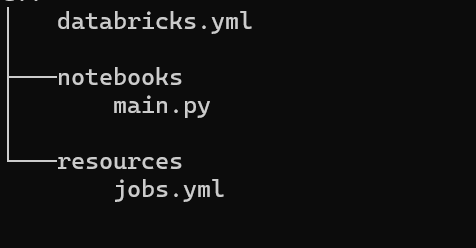
A typical databricks.yml configuration file includes notebooks or Python files, specifications for tasks and processes, environment-specific variables, and a central Declarative Automation Bundle definition; this framework ensures that the project is clear, easy to transfer, and simple to carry out in different environments.
Example folder structure:
2. Defining Assets as Code
All of Databricks's resources—such as jobs, tasks, schedules, and clusters—are specified in the Bundle configuration as code. This eliminates the need for manual configuration using the user interface and makes deployments completely reproducible.
Example job definition (resources/job.yml):
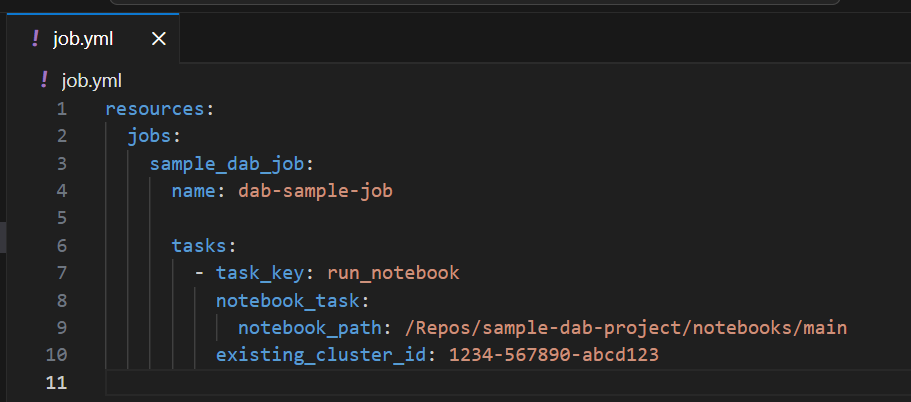
This method makes it possible to use the same job setup every time the bundle is deployed.
3. Environment Configuration
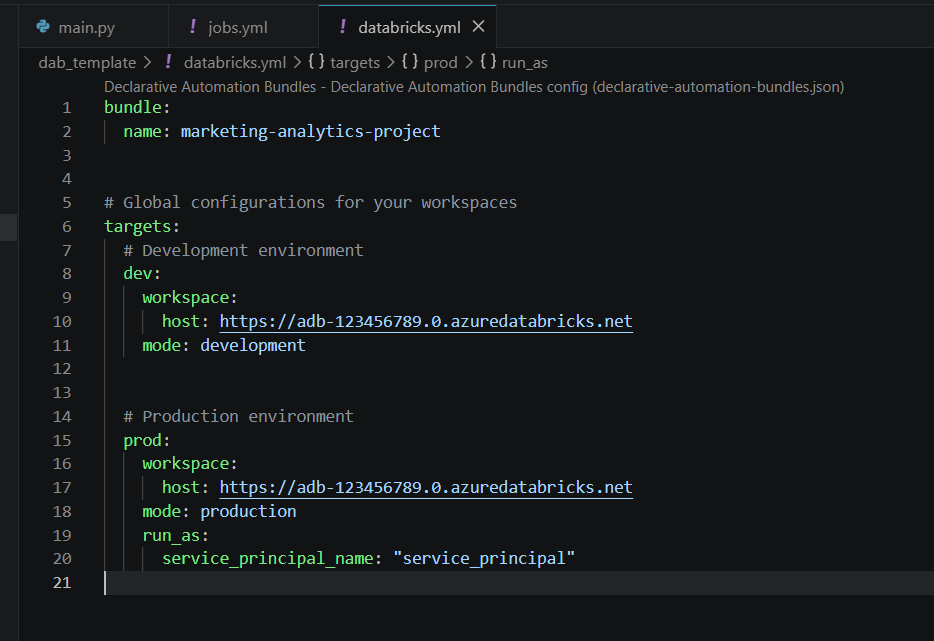
Declarative Automation Bundles use parameter overrides to fit different situations. The same package can be used for development, testing, or production, with variables for each environment, like workspace details, cluster size, or schedules.
Example environment configuration in databricks.yml :
4. Deployment
With the Databricks CLI, you can validate and deploy bundles with a few commands. This enables secure promotion of assets between environments
Example deployment commands:
Validate the bundle configuration
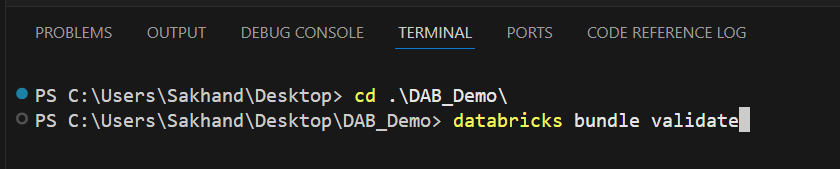
Deploy to the Development environment.

Deploy to Production environment.

Scalability and Monitoring
Seamless Monitoring
Since every job operates as a managed Databricks workflow, native monitoring is carried out using job run history, logs, metrics, alerts, and retries.
Effortless Scaling
You may quickly add new jobs or tasks to the bundle as pipelines expand without any requirement for a redesign. All that is required to keep the system ready for the future is changes to the settings.
Limitations and Workarounds
Limitations
- YAML-based configuration's initial learning curve
- Requires familiarity with the command line interface and Git.
Workarounds
- Standardized bundle templates
- Documentation and code reviews
- CI pipelines to validate bundles automatically
Real-World Scenario
Teams who struggle with manual Databricks deployments frequently suffer from unreliable releases and inconsistent environments. Through the use of Databricks Automation Bundles:
- Automated and repeatable deployments
- Environment drift is eliminated
- Operational effort is reduced
As a result, production releases are delivered more quickly and with more assurance.
How v4c.ai Can Help
Transitioning to a robust DataOps model doesn't have to be a manual uphill climb. At v4c.ai, we specialize in compressing the timeline from configuration to production by leveraging our deep Databricks expertise.
- DABs Implementation & Migration: Accelerate the deployment of Databricks Asset Bundles to ensure your workflows are entirely reproducible and version-controlled.
- Operational Excellence: Eliminate configuration drift and manual errors by utilizing our pre-built CI/CD and DABs accelerators to automate deployments.
- Strategy & Scalability: We tune your architecture to ensure good performance and cost-efficiency, so that your platform can scale smoothly as your data increases.
- Expert Support: Benefit from regular, Databricks-focused health checks and continuous pipeline optimization from our dedicated practitioners.
Conclusion
A simple, scalable, and DevOps-friendly way to manage Databricks assets is provided via Declarative Automation Bundles. By managing Databricks resources as code, teams may achieve consistency, dependability, and control over their data platforms. In current Databricks configurations, DAB is an essential phase for effective DataOps practices.
More blog posts