A Bi-Directional Salesforce Integration with Zero Copy

.avif)
Introduction
The "swivel-chair" situation, which involved constantly switching between Salesforce for CRM and Databricks for analytics, is beginning to disappear. Previous efforts at integration had made use of ETL pipelines, and these led to data duplication, higher storage costs and delays. A superior solution has now become available. The new integration employs a bi-directional zero-copy architecture.
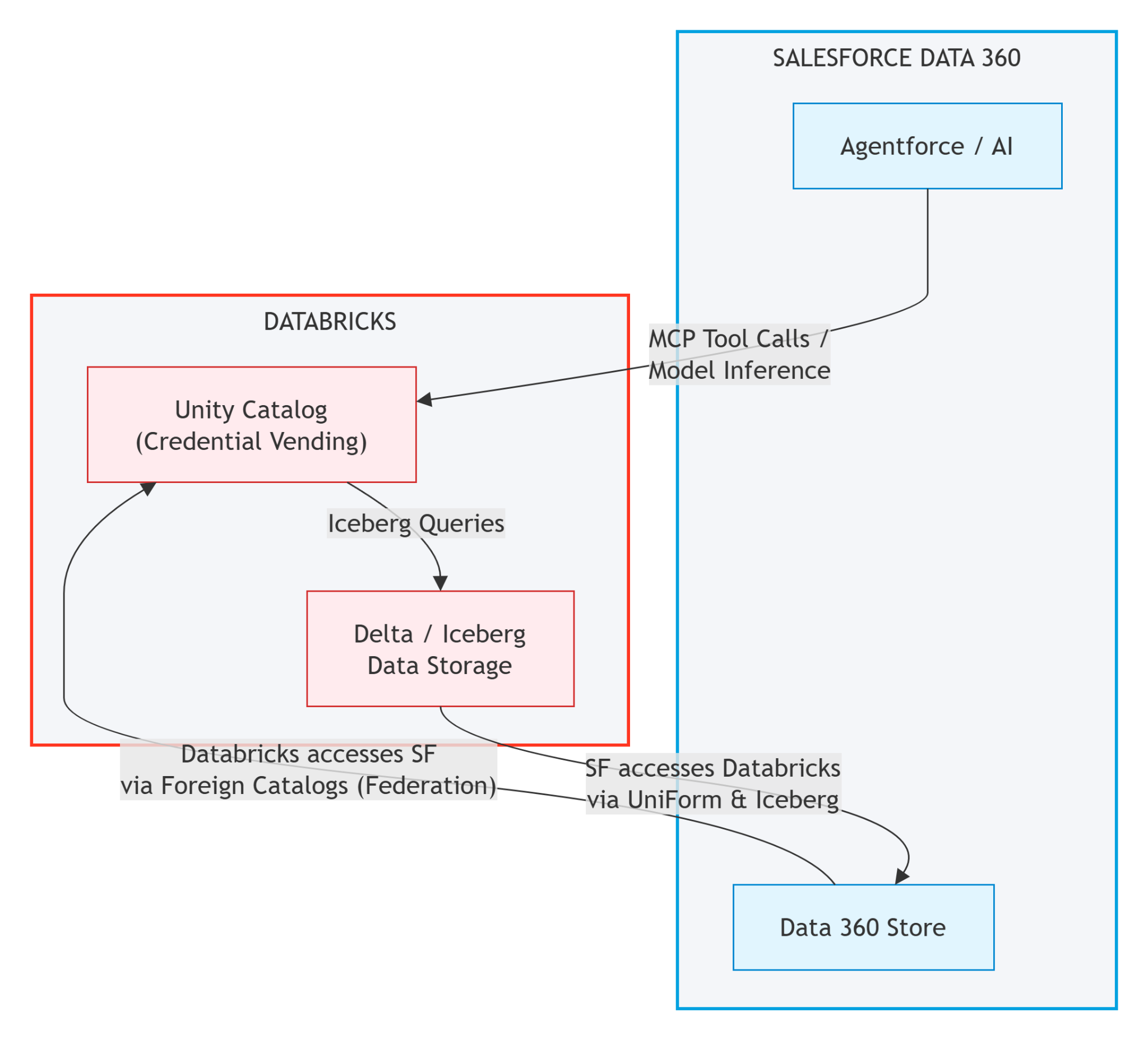
Databricks can access data from Salesforce Data 360 via Lakehouse Federation or Zero Copy File Sharing. Meanwhile, Salesforce retrieves data from Databricks tables using Zero Copy File Federation. With regard to storage, Data 360 reads UniForm-enabled Delta tables in the form of Apache Iceberg, all through the use of Unity Catalog credential vending. The outcome is an efficient link between Salesforce and Databricks, with no need to move the data, copy it or generate any additional overhead.
The Architecture: Federated Lakehouse
The integration between Databricks Zero Copy and Salesforce Data 360 alters the way data is exchanged between the two platforms by getting rid of the need for conventional ETL processes. Instead, each platform accesses the other's data directly, which reduces the amount of data that has to be moved, lowers latency and ensures that the data remains up to date.
The Zero Copy architecture relies on two key mechanisms:
- Lakehouse Federation / File Sharing (Salesforce Data 360 → Databricks): Enables Databricks to access Salesforce data directly. By means of federated query connections or file sharing, Salesforce Data 360 makes the data available so that the Databricks Unity Catalog can register the objects and then query them as a foreign catalog.
- Zero Copy File Federation via UniForm (Databricks → Salesforce Data 360): The ability for Salesforce Data 360 to read Databricks tables directly from object storage without any data being moved is made possible through UniForm (Databricks to Salesforce Data 360). When UniForm is enabled on Delta tables, Databricks produces Iceberg metadata in addition to the existing Parquet files, after which Salesforce Data 360 can read the files at the storage level using Unity Catalog credential vending.
By leveraging these technologies, the integration enables near-real-time access to Salesforce-housed data and Databricks tables without duplication, creating a two-way data flow.
- Lakehouse Federation — Databricks Accesses Salesforce Data 360
- How it works: Databricks users can query Salesforce objects through Unity Catalog foreign catalogs. Unity Catalog, the Databricks governance layer, holds the federated connection to Salesforce Data 360.
- Benefits: Data scientists and analysts can combine Salesforce customer, sales and service data with company data already in the lakehouse, such as web logs, IoT data or financial records. This removes the need for ETL pipelines to move Salesforce data into Databricks, and keeps analysts working against the current state of the source.
- Zero Copy File Federation — Salesforce Accesses Databricks Insights
- Model inference: Salesforce agents, particularly in the Agentforce application, can trigger Databricks-hosted models such as customer churn prediction or next-best-action recommendations. The results return to the agent’s workflow, improving the customer interaction.
- Direct querying of Gold-layer tables: Salesforce applications can query curated Gold-layer tables in the Databricks lakehouse through credential vending over UniForm and Iceberg metadata. This gives agents access to a unified, trusted view of the customer without data duplication.
Prerequisites
The requirements differ slightly by direction, but a few apply to both:
- A Databricks workspace enabled for Unity Catalog. A workspace still on the Hive metastore cannot participate in either direction.
- CREATE CONNECTION on the metastore, plus CREATE CATALOG on the metastore and either ownership of the connection or CREATE FOREIGN CATALOG on it.
- For query federation: a Salesforce connected app for OAuth and a Databricks secret scope holding its consumer key and secret. Databricks Runtime 15.2 or above on standard or dedicated access mode; SQL warehouses must be Pro or Serverless on 2024.30 or above.
- For file sharing: Databricks Runtime 16.3 or above on standard access mode, or a Pro or Serverless SQL warehouse. Single-user clusters are not supported.
- For File Federation: external data access enabled on the Unity Catalog metastore, EXTERNAL USE SCHEMA on every schema you expose, and UniForm enabled on each table you intend to federate. Enabling UniForm on a table that already exists requires Databricks Runtime 15.4 LTS or above.
Implementation Patterns: Federation, Sharing, and Agents
Step 1: Establishing Lakehouse Federation (The "Zero Copy" Read)
You can access Salesforce data from within Databricks without having to move the data by using Lakehouse Federation. This establishes a live connection with Salesforce Data 360, the connector sending the filters and aggregates down to Salesforce and then returning the result set to Databricks.
-- Create a connection to Salesforce Data 360
CREATE CONNECTION salesforce_dc
TYPE salesforce_data_cloud
OPTIONS (
  client_id     secret('sf_scope', 'client_id'),
  client_secret secret('sf_scope', 'client_secret'),
  pkce_verifier '<pkce_verifier from the previous step>',
  authorization_code '<URL-decoded authorization_code>',
  oauth_redirect_uri 'https://login.salesforce.com/services/oauth2/success',
  oauth_scope 'cdp_api api cdp_query_api refresh_token offline access',
  is_sandbox 'false'
);

-- Create a Foreign Catalog to query Salesforce Data 360 objects
CREATE FOREIGN CATALOG salesforce_external
USING CONNECTION salesforce_dc
OPTIONS (dataspace 'default');
There are two items in that snippet which should be checked twice. The oauth_redirect_uri for the SQL path is Salesforce's success URL, not a Databricks callback, and the connected app must support it. The oauth_scope string is the typical cause why a connection authenticates but then returns nothing that can be queried; it should be noted that the Databricks SQL example includes 'offline access' with a space whereas the Catalog Explorer instructions use 'offline_access' with an underscore. The dataspace option is required, and the default value is the common one.
Note: Use Lakeflow Connect only if you require a physical "Golden Copy" for high-performance ML training that exceeds the latency limits of a federated query.
Step 2: Bi-Directional Zero Copy via UniForm
The "Zero Copy" exchange is a two-way street. To let Salesforce read Databricks data without a copy activity, we use UniForm (Universal Format).
- Enable UniForm: This allows a Delta table to be read as Apache Iceberg, the format Salesforce Data 360 reads at the storage layer.
- The access mechanism: Salesforce Data 360 connects through a Databricks File Federation connection rather than a Delta Sharing profile. It reads the table through the Unity Catalog Iceberg REST catalog endpoint, https://<workspace-instance>/api/2.1/unity-catalog/iceberg-rest. Authentication is either a Databricks personal access token or an identity-provider-based service principal, which is the better production choice.
-- Enable UniForm so Databricks generates Iceberg metadata for Salesforce Data 360.
-- Enabling this on an existing table requires DBR 15.4 LTS or above.
ALTER TABLE gold.customer_segments
SET TBLPROPERTIES (
  'delta.columnMapping.mode'             = 'name',
  'delta.enableIcebergCompatV2'          = 'true',
  'delta.universalFormat.enabledFormats' = 'iceberg'
);
Two things to know before running this on a production table. Column mapping is required, and it is a one-way door: once IcebergCompatV2 is set, you cannot drop the columnMapping table feature, and the writer protocol is upgraded so only clients that support the feature can keep writing. And the Iceberg metadata is generated asynchronously, on the same compute that wrote the Delta data, so there is a short lag between a Databricks write and the moment Data 360 can see it. Verify the table with DESCRIBE EXTENDED and look for the Delta Uniform Iceberg section. If the table already has deletion vectors enabled, use REORG to purge them while enabling Iceberg reads, because the plain ALTER will not clear them.
Step 3: Powering Agentforce with Databricks (The MCP Pattern)
The most sophisticated integration makes use of the Model Context Protocol (MCP); in this approach, Databricks does not simply offer data but also provides tools that integrate logic with data, which are then invoked by Salesforce Agentforce to carry out complex reasoning.
Tool logic: the tool queries the federated catalog created in Step 1, so it reads live Data 360 records with no sync delay.
-- Define the tool as a Unity Catalog function.
-- Registered in UC, it becomes an 'Action' for Agentforce via MCP.
CREATE OR REPLACE FUNCTION main.tools.get_realtime_inventory(
  prod_id STRING
    COMMENT 'Product ID to look up, as it appears in the Data 360 inventory object.'
)
RETURNS TABLE (
  product_id STRING, on_hand DECIMAL(38,18), last_updated TIMESTAMP
)
COMMENT 'Live inventory position for one product, read from Salesforce Data 360.'
RETURN
  SELECT product_id, on_hand, last_updated
  FROM salesforce_external.web_store.inventory
  WHERE product_id = prod_id
  LIMIT 100;
The reason a SQL function is used rather than a Python one is that the Databricks documentation states the syntax and semantics of Python UDFs in Unity Catalog are different from those of Python UDFs registered to a SparkSession, and that Unity Catalog Python UDFs operate in an isolated environment without access to file systems or internal services. A function in a notebook which uses spark.sql() will not be able to be converted into a Unity Catalog function and executed. In cases where the logic actually requires Spark or a model—for example, for a Prophet forecast or an ML inference step—place that functionality behind a Model Serving endpoint and register it as a second tool.
The parameter is bound rather than interpolated into a string, so there is no injection surface. The LIMIT matters too: SQL clients cap the rows and bytes they return, and an unbounded SELECT * handed to an agent will either truncate silently or exhaust its context. Both COMMENT clauses are the tool description the agent reasons over when deciding whether to call the function, so write them for the model rather than for a colleague.
Databricks makes the functions of Unity Catalog available via a managed MCP server, so there is no need to build or host anything. The endpoint adheres to the following pattern:
https://<workspace-hostname>/api/2.0/mcp/functions/{catalog}/{schema}/{function_name}

# For the function above:
#   .../api/2.0/mcp/functions/main/tools/get_realtime_inventory
# OAuth scope: unity-catalog
Unity Catalog enforces permissions on every call, so an agent only sees the tools and data its principal has been granted. Register the server in the Agentforce Registry, select which tools the org may use, and each one becomes an action available to a subagent. Managed MCP servers are in Public Preview at the time of writing.
Limitations
The Zero Copy integration between Salesforce Data 360 and Databricks is intended to avoid the constant give-and-take between the two platforms. Although this does result in lower costs and latency, it does have a number of specific technical and operational limitations that are worth considering:
- Ingestion Scalability:
- Limitation: Tasks that require a high level of computing power may reach their performance limits and could then necessitate the use of a physical copy of the data through Lakeflow Connect.
- Workaround: Apply federation to time-sensitive tasks and use Lakeflow Connect for large, compute-intensive datasets.
- Query Pushdown:
- Limitation: If the source system is unable to interpret complex SQL commands, then all the data must be retrieved and processed locally, and joins and window functions are not pushed down to Data 360 at all.
- Workaround: Simplify queries or pre-shape the data at the source through views, so Databricks receives a smaller result set.
- Compute Dependency:
- Limitation: When Databricks uses the external storage layer as its compute engine, the speed at which data can be retrieved is determined by the configuration of the source system and by the amount of traffic it is handling at the same time.
- Workaround: Cache frequently queried data and schedule complex queries away from the external system’s peak.
- Network Latency and Regionality:
- Limitation: Transferring data from one cloud region to another results in a delay since the data centres are located in different places.
- Workaround: Put the Databricks workspace in the same cloud region as the data source it reads most.
- Cloud Egress Costs:
- Limitation: Even though zero copy gets rid of the costs associated with redundant storage, cloud providers still charge for the actual data transfer when it is retrieved.
- Workaround: Apply WHERE and LIMIT filters in Databricks to reduce the volume of data crossing regions.
Results & Performance
By implementing Zero Copy integration:
- Latency: data availability shifts from a batch window measured in hours to a live query against the source. How much you gain depends on the query and the source system’s load, so measure it on your own workload rather than assuming a fixed figure.
- Storage: There is no duplication of data; Salesforce accesses your S3 or ADLS bucket directly, and Data 360 functions as a virtual extension of the lakehouse rather than as a separate copy of it.
- Governance: For governance, Unity Catalog is the one source of authority regarding permissions, and the same permissions apply regardless of whether the user is a Databricks analyst, a Data 360 user, or an Agentforce agent invoking a function via MCP.
- Operational simplicity: every scheduled sync retired is a job that can no longer fail overnight, and the "swivel-chair" effect goes with it.
- Schema and partition changes: the metadata of Apache Iceberg passes the structural changes from Databricks on to Salesforce without the need for a manually maintained mapping, with the asynchronous generation lag mentioned in Step 2 still applying.
How v4c.ai Can Help
v4c.ai has the technical know-how to set up a bi-directional data flow by making use of Databricks features including Unity Catalog and Lakehouse Federation, which enables Salesforce Data 360 to function as a virtual extension of the Databricks lakehouse. In practice, this involves deciding whether to use query federation or file sharing for a particular workload, turning on UniForm for tables that are already equipped with deletion vectors and have downstream Delta readers, and making sure the OAuth scope is correct the first time.
In addition to providing basic connectivity, v4c.ai enables AI-driven workflows by connecting Databricks with Salesforce Agentforce. We assist teams in setting up the Model Context Protocol layer and in presenting the Databricks logic as narrow, governed Unity Catalog functions rather than as general query tools, so that Salesforce agents will be able to trigger real-time logic and ML models within Databricks while the agent layer retains the lakehouse permission model. The objective is to get teams to move from reactive troubleshooting to proactive customer engagement, with a single governance layer covering the entire ecosystem.
Conclusion
Bi-directional zero-copy integration turns Salesforce into a virtual window onto the Databricks lakehouse, giving agents a single source of truth. By dissolving the boundary between the CRM and the lakehouse, organisations can run their Salesforce environment as part of a unified, real-time data architecture rather than as a separate copy of the same data.
Connecting Salesforce Agentforce with Databricks also means AI operates on current, governed data. The result is proactive customer engagement built on shared data, with security intact and no manual file transfers in the middle.
References
- Lakehouse Federation for Salesforce Data 360 File Sharing
- Run federated queries on Salesforce Data 360
- Read Delta tables with Iceberg clients (UniForm)
- Enable external data access to Unity Catalog
- Access Databricks tables from Apache Iceberg clients
- Databricks managed MCP servers
- Create agent tools using Unity Catalog functions
- SQL and Python user-defined functions in Unity Catalog
- What is Model Context Protocol (MCP)?
- Why Data 360’s Zero Copy Makes Business and Technical Sense
- What is Zero Copy? (and How It Works)
- Accessing Databricks data in Salesforce via zero copy
- Salesforce Agentforce
More blog posts
.png)


.png)