Migrating Custom Scala JARs to Databricks Serverless

A Practical Migration Guide with Real Constraints, Failures, and Fixes
We migrated a legacy Scala JAR–based job from a classic Databricks job cluster to Serverless compute. Although the job had run reliably for years, the move to Serverless exposed architectural constraints that required coordinated changes across the build, runtime, and deployment model.
This article documents the migration end-to-end, focusing on the specific technical components that mattered, the failure modes that were not obvious up front, and the exact configuration that ultimately worked.
Original Job Architecture
The workload being migrated was a typical legacy Scala batch job:
- Packaged as a custom Scala JAR
- Deployed using Databricks Jobs
- Executed on classic job clusters
- Built with Scala 2.12
- Direct dependencies on spark-core and spark-sql
- Artifact stored in Unity Catalog Volumes
From a classic computing perspective, this setup is entirely standard. Nothing about the job or its deployment raised concerns until Serverless was introduced.
Serverless Constraints That Impact Scala Jobs
Databricks Serverless is not an incremental evolution of classic clusters. It enforces a different execution and dependency model that directly affects Scala workloads.
- Serverless does not run applications as traditional Spark driver processes. Instead, code executes as a client that communicates with a remotely managed Spark environment. This eliminates driver-side behavior that many Scala jobs implicitly depend on, including access to Spark internals and RDD APIs.
- Serverless runs in a shared, hardened environment with strict dependency isolation. Libraries cannot be dynamically installed, classpath behavior is tightly controlled, and all dependencies must be resolved before execution begins.
- Serverless enforces a hard constraint on the Scala version. Databricks Serverless (DBR 17+) supports Scala 2.13 only, with no backward compatibility for earlier versions.
The Initial Failure
Early attempts to deploy the job to Serverless failed during startup with generic library installation errors. The failures occurred both in the Databricks Jobs UI and when submitting runs through the Jobs REST API. At the same time, the identical JAR continued to run successfully on classic clusters.
The misleading nature of the error made diagnosis difficult. Permissions were correct, the artifact was valid, and the build had not changed. The failure was caused by how Serverless resolves custom JARs, not by the JAR itself.
Why JAR Loading Behaves Differently on Serverless
On classic clusters, custom JARs are typically defined as task-level libraries and resolved by the cluster runtime. This model is flexible and allows jobs to evolve organically over time.
Serverless uses a different approach. Dependency resolution happens at the environment level rather than the task level, and standard Serverless runtimes do not support loading Volume-backed JARs using the same mechanisms as classic compute. When this limitation is hit, the platform fails early with limited diagnostic detail.
This distinction is critical. It means the migration cannot be fixed with small configuration tweaks and requires changes to both the target runtime and the job definition itself.
Required Changes (All Are Mandatory)
The migration succeeded only after applying all of the following changes together. Treating any of them as optional resulted in deployments that still failed at runtime.
Step 1: Target the Serverless Scala Preview Runtime
Scala and Java workloads on Serverless are gated behind a preview feature. In addition to enabling this preview, jobs must explicitly target a specific preview runtime that supports loading JARs from Unity Catalog Volumes.
The required configuration is:
environment_version = "4-scala-preview"
Without explicitly targeting this runtime, Serverless does not support the dependency resolution behavior required for custom Scala JARs.
Step 2: Upgrade the Codebase to Scala 2.13
Once the correct runtime was in place, upgrading the codebase to Scala 2.13 became mandatory.
This involved:
- Migrating from Scala 2.12 to 2.13
- Auditing all third-party dependencies for Scala 2.13 compatibility
- Replacing or removing unsupported libraries
Several dependencies that worked quietly on classic clusters became immediate blockers under Serverless due to the lack of backward compatibility.
Step 3: Remove Spark Core and SQL Dependencies
Serverless does not support the classic Spark driver execution model. As a result, spark-core and spark-sql must be removed entirely.
This required refactoring code that depended on Spark internals, removing RDD-based logic, and eliminating assumptions about driver-local execution. This step marks the point where the migration becomes architectural rather than operational.
Step 4: Switch to Databricks Connect
With direct Spark dependencies removed, all interaction with Spark on Serverless must go through Databricks Connect.
In this model:
- The application acts as a Spark client
- Spark execution happens remotely
- Certain driver-side operations are no longer available
The Databricks Connect dependency must be added carefully and marked as provided to avoid bundling platform libraries into the application artifact.
Step 5: Package a Single Fat JAR
Serverless enforces strict dependency isolation. The safest approach is to package all non-platform dependencies into a single fat JAR.
At the same time, Spark and Databricks-provided libraries must not be shaded or bundled, as doing so can introduce classpath conflicts that are difficult to debug in a Serverless environment.
Step 6: Move JAR Configuration to the Environment Level
The most subtle and failure-prone change involved how the JAR was referenced in the job definition.
On Serverless:
- Custom JARs must be defined at the environment level
- JAR paths must be listed under java_dependencies
- Task-level library definitions are not supported for this use case
Example:
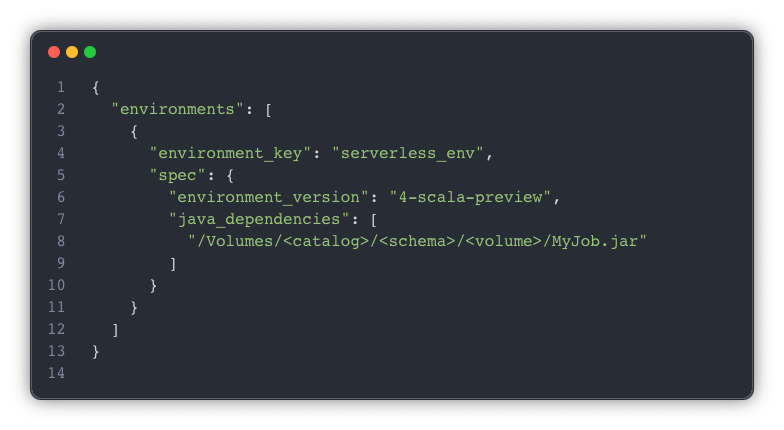
Once the JAR was moved into the environment specification and the task referenced that environment, deployments became stable and repeatable.
Classic vs. Serverless: At A Glance

These are not edge cases. They are core design decisions that shape how Scala workloads must be built and deployed on Serverless.
Operational Considerations
This approach relies on a preview runtime and behavior that is still evolving. APIs may change, and features that are currently gated may become generally available in different forms. Any production deployment should include validation against the current Databricks release notes and a plan for adapting to future Serverless updates.
When This Pattern Is a Good Fit
This approach is well-suited for teams with existing Scala JAR workloads that need to move to Serverless for cost, scaling, or operational reasons, particularly when deployments are automated through the Jobs API and artifacts are stored in Unity Catalog Volumes.
It is less appropriate for workloads that rely heavily on driver-side Spark behavior or RDD APIs. For new Scala development, designing directly for the Serverless execution model is strongly recommended.
Final Takeaway
The primary challenge in this migration was not an undocumented API or a missing configuration flag. It was aligning the application architecture with the Serverless execution model.
Once the job was treated as a client, dependencies were made explicit, and JAR loading was handled at the environment level. Serverless behaved predictably and consistently. That architectural alignment—not any single fix—was what ultimately made the migration successful.
More blog posts
.png)



.png)