Lakeflow Designer: Building Low-Code/No-Code ETL Pipelines

.png)
When stepping into the world of data engineering, new professionals often share a common realization. The initial challenge isn't usually the complex Spark architecture, but rather the tedious setup for simple tasks: "Does it really require this much code just to join two tables and filter some rows?"
Historically, the answer was a reluctant yes. Today, that changes with Databricks Lakeflow Designer.
Lakeflow Designer is a visual, drag-and-drop interface for building data pipelines directly within the Databricks workspace. It allows you to ingest, transform, and export resultant data without writing a single line of PySpark or SQL if you prefer not to. It acts as a GUI layer on top of Databricks' declarative pipeline engine, giving you ETL capabilities through a visual canvas.
Feature Overview
Through recent practical explorations of the tool, several essential features have emerged as being particularly vital for routine operations:
- Intuitive Visual Canvas: You can build pipelines by joining nodes together. Data sources, transformations, and destinations are all represented visually.
- Live Data Previews: Once you click on a node, the interface provides a real-time sneak peek of the data based on the stage of transformation you’re applying on that node.
- Native Unity Catalog Integration: Lakeflow Designer reads from and writes to Unity Catalog seamlessly. Governance and access controls apply automatically.
- Dual-Mode Editing: Whenever necessary you can toggle to a SQL view from a Visual View to write custom queries for specific nodes if the visual tools don't cover the logic you’re looking to implement.
- Built-in Orchestration: Once your design is done, you can schedule it directly via Databricks Workflows without needing to context-switch.
The Unique Advantages of Lakeflow Designer
Lakeflow Designer stands out from other low-code ETL platforms by avoiding proprietary, black-box code. Instead, its interface translates directly into Databricks native framework, providing the same scalability, automatic retries, and infrastructure management as regular ETL pipelines. Furthermore, its real-time interactive data preview at the bottom of the interface eliminates the need to run/execute a query to see its result in turn increasing the speed of development.
Databricks Ecosystem Scenarios
Where does this feature fit into your existing Databricks architecture?
If you look at the Databricks platform today, Lakeflow Designer sits squarely in the middle of the data lifecycle. It complements Lakeflow Connect, which handles getting raw data out of external systems (like databases or Salesforce) and into Databricks.
Once that raw data lands in Unity Catalog as bronze tables, Lakeflow Designer takes over. You use it to clean, join, and aggregate that data into silver and gold tables. Finally, those gold tables are consumed by Databricks SQL dashboards, ML models, or GenAI agents. It is strictly a transformation layer for data that the platform already has access to.
Detailed Step-by-Step Implementation: Building a Pipeline
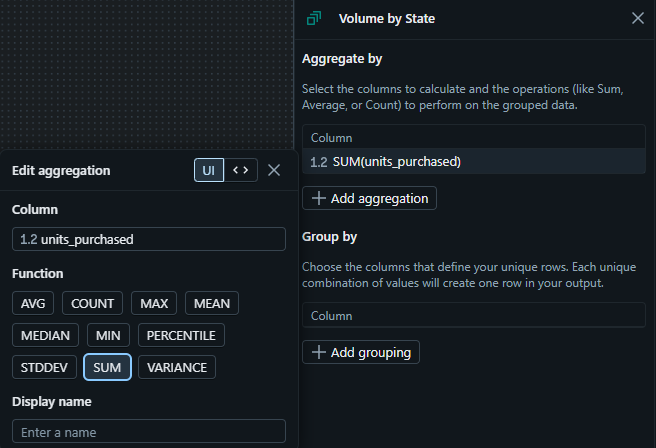
We are going to take raw sales data, filter for high-value loyalty segments, and aggregate the total units purchased by state.
Step 1: Launch the Designer
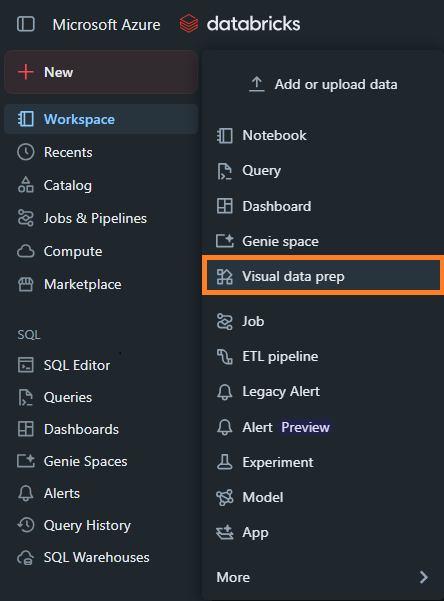
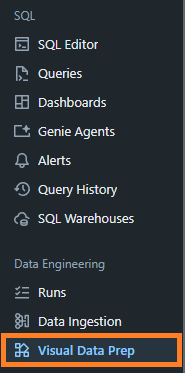
Log into your Databricks workspace. There are two straightforward ways to access the blank canvas:
- Via the + New Button:
- Via the Visual Data Prep tab:
Step 2: Add Your Source Data
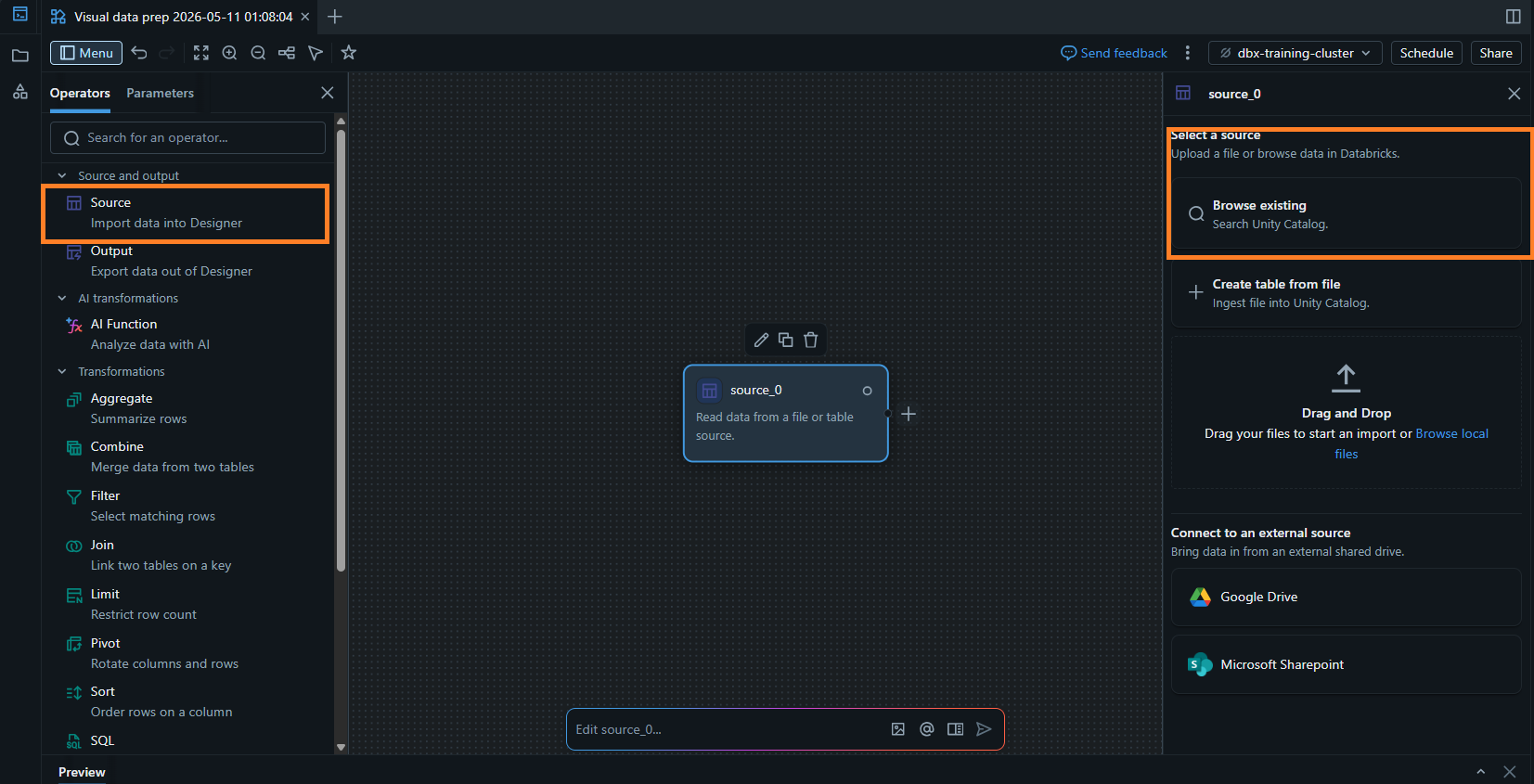
Look at the "Operators" panel on the left side of your screen. Under the "Source and output" category, drag a "Source" node onto your main canvas (it will default to the name source_0).
- Browse existing: Search directly through Unity Catalog for established tables.
- Create table from file / Drag and Drop: Upload local flat files right into the workspace.
- Connect to an external source: Pull data directly from external shared drives like Google Drive or Microsoft SharePoint.
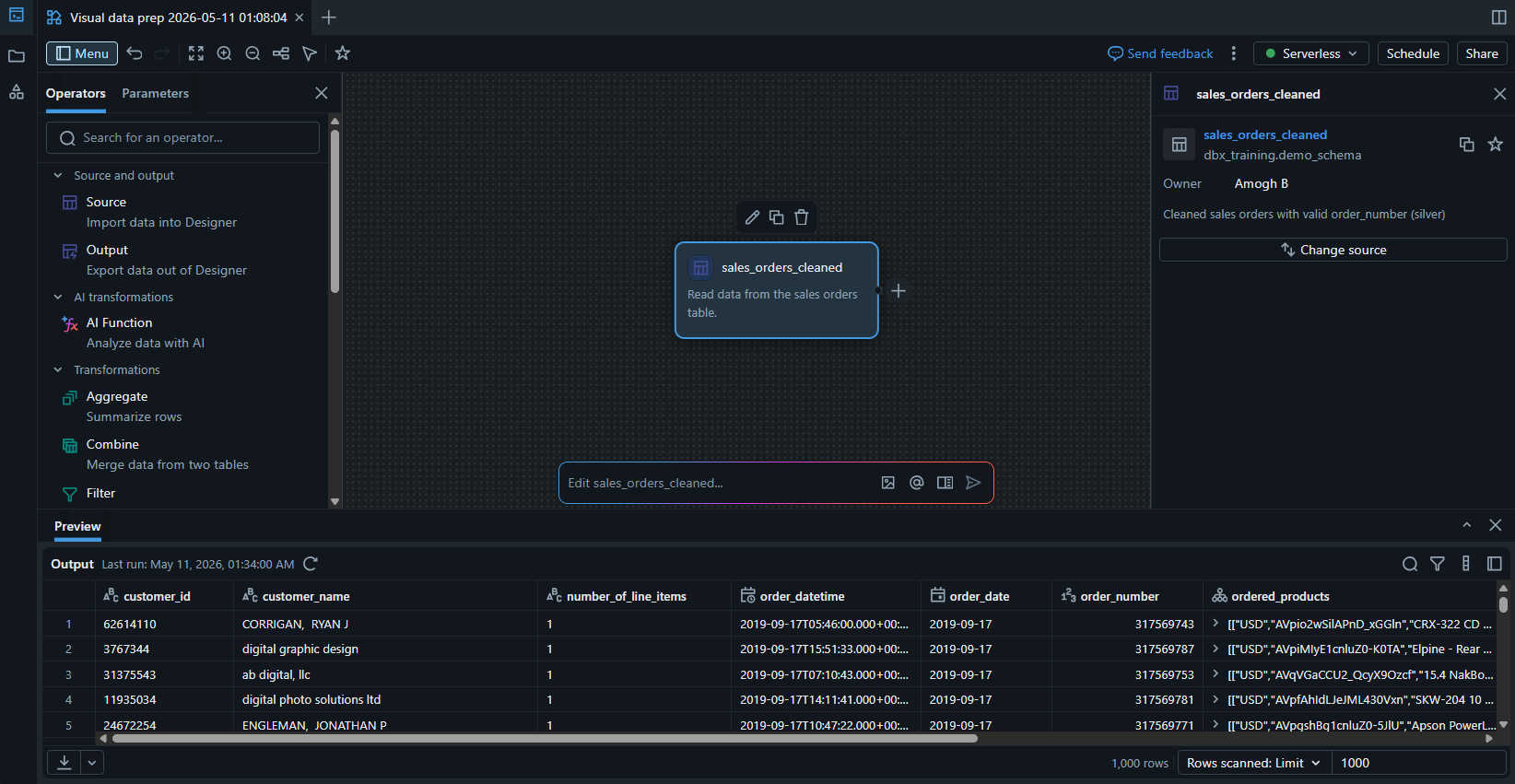
Step 3: Preview the Data at the bottom of the interface.
Preview the sales order data loaded in the previous step
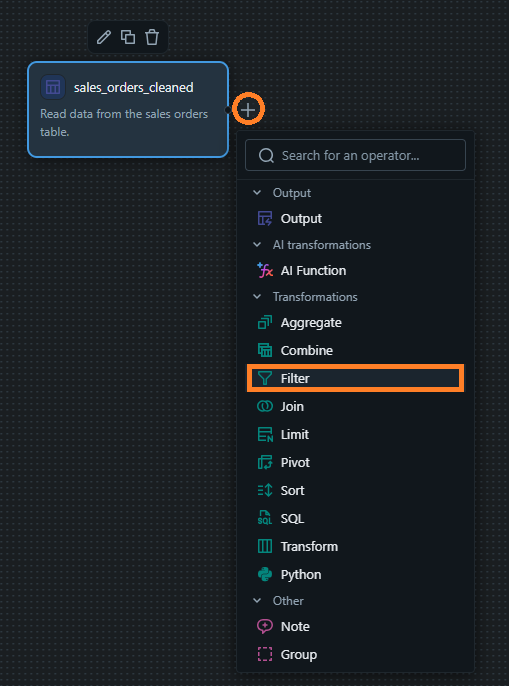
Step 4: Applying Filter for High-Value Segments
Apply a filter to segregate high-value loyalty segments from the sales orders table.
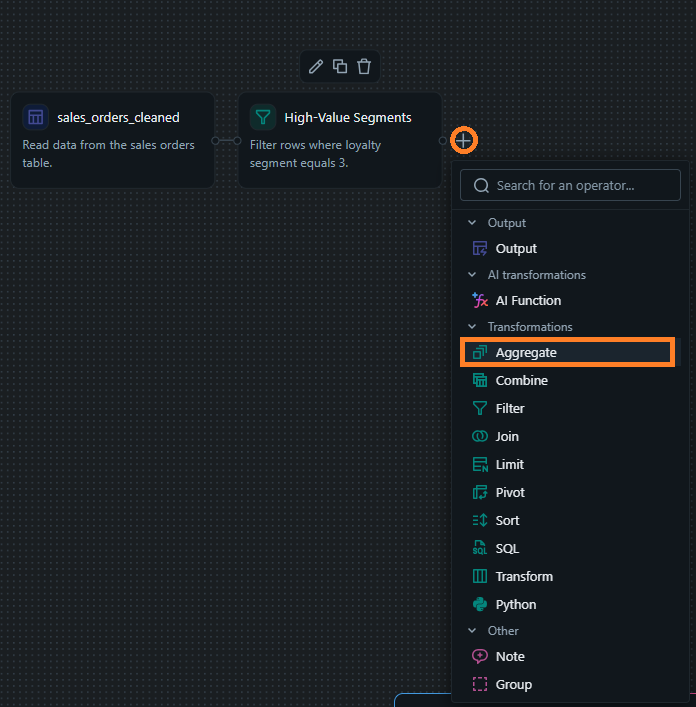
Step 5: Aggregating Volume by State
Create an aggregated SUM of the units purchased
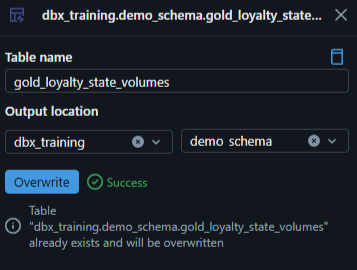
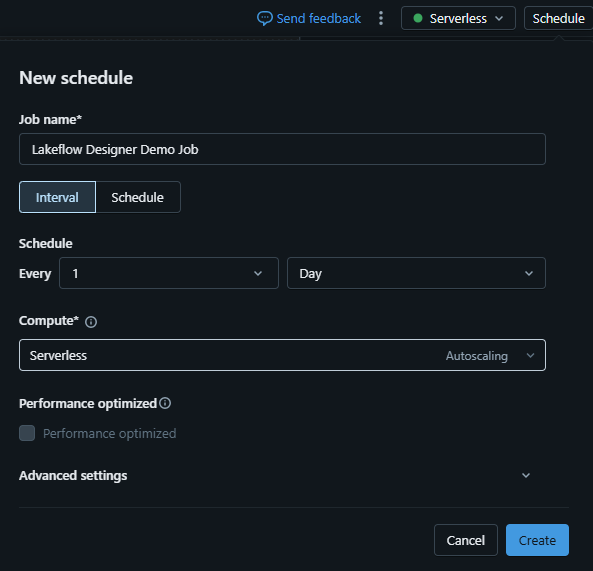
Step 6: Defining the Target and Schedule for running the pipeline.
Define a target table to push your aggregated data in the Unity Catalog and add a schedule for periodic job runs
Alternative Approach: Leveraging the capabilities of Genie Code
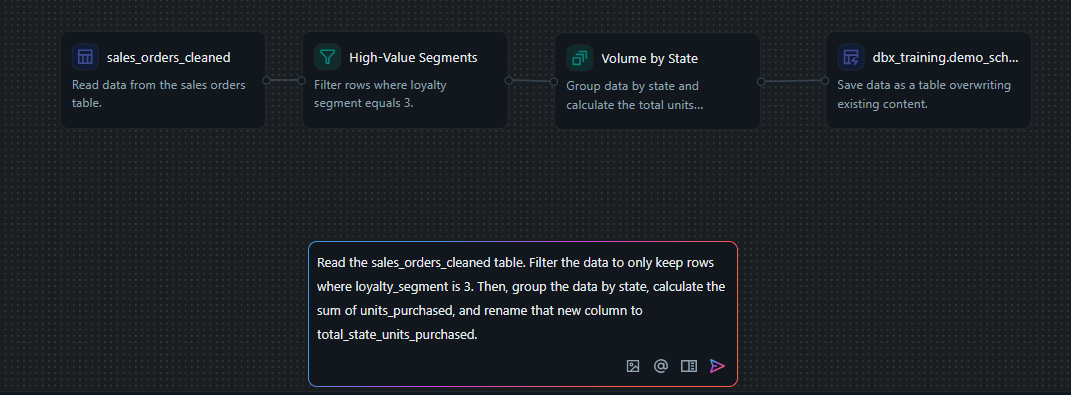
If you noticed the prompt bar at the bottom of the Lakeflow Designer interface, that is Genie Code. To recreate the pipeline we just built using Genie, use the following prompt:
"Read the sales_orders_cleaned table. Filter the data to only keep rows where loyalty_segment is 3. Then, group the data by state, calculate the sum of units_purchased, and rename that new column to total_state_units_purchased."
Scaling Up: Building Accelerators
To scale effectively with Lakeflow Designer, organizations should stop building individual pipelines from scratch and instead create "accelerators". By collaborating across teams to identify shared requirements like PII masking or currency conversion to name a few, the delivery teams can build "master" pipelines. New project teams can then simply clone these templates, swap out specific source tables or filters, and publish, which eliminates redundant work and ensures organization-wide data consistency.
Final Thoughts
By putting a visual, governed layer on top of a highly robust pipeline engine, Databricks gives business users agency over their own data logic. Engineers gain time to focus on complex infrastructure, streaming architectures, and system optimization, while analysts receive data immediately. It serves as a highly functional solution to a bottleneck that has plagued the industry for years, and it is a practical feature for modern data curriculum.
How v4c.ai Can Help
As a Databricks Partner, v4c.ai helps you maximize Lakeflow Designer by building scalable, enterprise-grade data accelerators. Our certified experts implement governed ETL templates that eliminate redundant work and ensure data consistency across your entire ecosystem. Whether you are modernizing your architecture or empowering business users, we provide the end-to-end enablement needed to accelerate your time-to-insight.
References
More blog posts
.png)