LakeForge: Databricks Lakebase Provisioning with GitHub OIDC and Asset Bundles
.png)
Project Objective
LakeForge is a Databricks Asset Bundle project for provisioning Databricks Lakebase resources from GitHub Actions. The repository defines a CI/CD path that accepts a Lakebase project name and a list of branch names, generates the required bundle resource definition, validates the bundle, and deploys or destroys the resulting Lakebase topology.
The project also includes a small Python package for application connectivity. The package creates synchronous and asynchronous psycopg connection pools for Lakebase. Instead of storing a static database password, the connection class requests a Databricks-generated database credential immediately before opening a physical PostgreSQL connection.
The implementation focuses on four technical requirements:
● Lakebase infrastructure should be reproducible from workflow inputs.
● GitHub Actions should authenticate to Databricks without long-lived Databricks tokens.
● Generated Lakebase resources should remain explicit before bundle validation and deployment.
● Application database connections should use short-lived Databricks-generated credentials.
Environment And Version Baseline
The implementation inspected for this write-up uses the following versions and constraints.
The bundle target defines Lakebase autoscaling values:
lakebase_min_cu: 2
lakebase_max_cu: 8
The minimum and maximum CU values can be configured in the databricks.yaml file.
The bundle root path includes the runtime project name:
/Workspace/Users/${workspace.current_user.userName}/.bundle/${bundle.name}/${var.project_name}
This isolates bundle state by Lakebase project name. Deployments for different project names do not share the same bundle state directory.
Required Configuration
LakeForge has two configuration surfaces: the CI/CD workflow configuration used to deploy Lakebase resources, and the Python library configuration used by application code when connecting to Lakebase.
CI/CD Configuration
The CI/CD path requires a Databricks workspace with Lakebase enabled and a
Databricks service principal configured for GitHub OIDC. The GitHub repository must
provide these secrets:
DATABRICKS_HOST
DATABRICKS_CLIENT_ID
The workflows set the Databricks authentication environment as follows:
env:
DATABRICKS_AUTH_TYPE: github-oidc
DATABRICKS_HOST: ${{ secrets.DATABRICKS_HOST }}

DATABRICKS_CLIENT_ID: ${{ secrets.DATABRICKS_CLIENT_ID }}
These values allow the Databricks CLI to authenticate from GitHub Actions through
OIDC. They are used by the deploy and destroy workflows before running Databricks
Asset Bundle commands.
LakeForge Library Configuration
The LakeForge Python connection utilities read PostgreSQL connection metadata from
environment variables unless values are provided directly:
export PGHOST="<lakebase-host>"
export PGPORT="5432"
export PGDATABASE="<database-name>"
export PGUSER="<database-user>"
export LAKEBASE_ENDPOINT="<lakebase-endpoint-id>"
Note : These values are connection metadata. They are not database passwords. The database credential is requested through the Databricks SDK at connection time. The repository should not contain Databricks personal access tokens, OAuth access tokens, service principal secrets, PostgreSQL passwords, or generated Lakebase database credentials. If static secrets are required in a different deployment model, they should be stored in Databricks secrets or a cloud-native secret vault rather than source control.
Resource Model
LakeForge uses one Lakebase project with one or more branches under that project.
The deployment workflow accepts:
project_name=lakeforge-main
custom_branches=dev,staging,pre-prod
The generated topology is:
lakeforge-main
|-- dev
| `-- readonly endpoint
|-- staging
| `-- readonly endpoint
`-- pre-prod
`-- readonly endpoint
If custom_branches is empty, the generator creates a single dev branch.
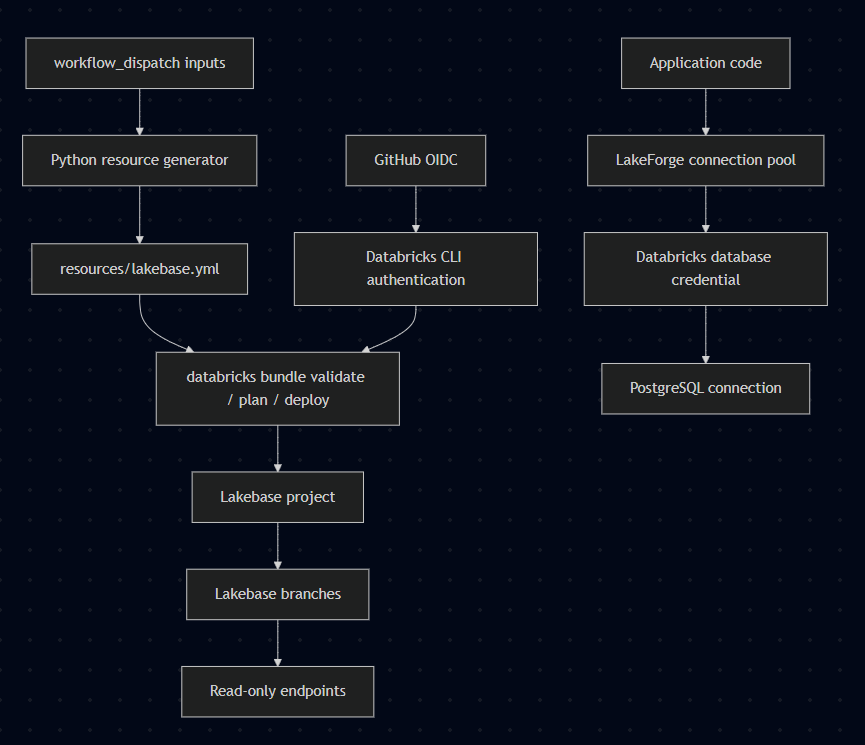
The generator converts workflow input into explicit Asset Bundle resources. The bundle still receives static YAML at validation and deployment time. The generator is only responsible for topology: project, branches, and endpoints. Compute settings and PostgreSQL version remain bundle variables.
Design Choice: Branches Instead Of Multiple Bundle Targets
The repository does not model dev, staging, and prod as separate Databricks bundle targets. It models them as Lakebase branches inside one Lakebase project.
This choice fits the current implementation because the branch list is an input to the workflow. The same workflow can create dev, staging, pre-prod, or another branch list without maintaining separate target blocks for each combination.
The operational consequence is that deployment and destruction must use the same topology input. The destroy workflow regenerates resources/lakebase.yml before running databricks bundle destroy --auto-approve. If the destroy run uses a different branch list from the deploy run, the generated resource graph no longer describes the same resources.
Deployment Workflow
The deployment workflow is manually triggered through workflow_dispatch. It requires:
project_name
custom_branches
The workflow sequence is:
checkout repository → setup Python 3.10 → install pyyaml → generate resources/lakebase.yml
→ set BUNDLE_VAR_project_name → install Databricks CLI → show Databricks identity → validate bundle
→ plan bundle → deploy bundle
The Databricks bundle commands are:
databricks bundle validate
databricks bundle plan
databricks bundle deploy
The destroy workflow follows the same generation step, sets the same bundle variable, authenticates to Databricks, and runs:
databricks bundle destroy --auto-approve
For production-like resources, --auto-approve should be reviewed. The current implementation is suitable for controlled manual workflow runs. A stricter setup would use GitHub environments, required reviewers, or an explicit approval step before destruction.
Dynamic Resource Generation
The generator script reads:
PROJECT_NAME
CUSTOM_BRANCHES
PROJECT_NAME is required. CUSTOM_BRANCHES is optional. Empty CUSTOM_BRANCHES produces dev.
Local generation can be tested with:
python -m pip install pyyaml
PROJECT_NAME=lakeforge-main CUSTOM_BRANCHES=dev,staging,pre-prod python src/scripts/generate_lakebase_resources.py
Expected output:
Successfully generated resources/lakebase.yml for project: lakeforge-main
Branches: dev, staging, pre-prod
The generated YAML contains a project, a branch per input branch, and a read-only endpoint per branch:
resources:
  postgres_projects:
    lakebase_project:
      project_id: ${var.project_name}
      display_name: ${var.project_name}
      pg_version: ${var.pg_version}
  postgres_branches:
    branch_pre_prod:
      parent: ${resources.postgres_projects.lakebase_project.id}
      branch_id: pre-prod
      no_expiry: true
  postgres_endpoints:
    endpoint_pre_prod_readonly:
      parent: ${resources.postgres_branches.branch_pre_prod.id}
      endpoint_id: readonly
      endpoint_type: ENDPOINT_TYPE_READ_ONLY
      autoscaling_limit_min_cu: ${var.lakebase_min_cu}
      autoscaling_limit_max_cu: ${var.lakebase_max_cu}
Branch names are preserved as Lakebase branch IDs. Resource keys are sanitized for YAML compatibility. For example, pre-prod becomes a resource key such as branch_pre_prod, while the Lakebase branch ID remains pre-prod.
This implementation needs one additional guard before production use: sanitized key collision detection. feature-a and feature_a both sanitize to feature_a. The generator should detect that case and fail before writing YAML.
Python Connection Utilities
The package exposes:
from lakeforge.lakebase import (
    get_pool,
    get_async_pool,
    create_oauth_connection_class,
    create_async_oauth_connection_class,
)
Synchronous usage:
from lakeforge.lakebase import get_pool

pool = get_pool()

with pool.connection() as conn:
    with conn.cursor() as cur:
        cur.execute("select 1")
        print(cur.fetchone())
Asynchronous usage:
from lakeforge.lakebase import get_async_pool

pool = get_async_pool()

async with pool.connection() as conn:
    async with conn.cursor() as cur:
        await cur.execute("select 1")
        result = await cur.fetchone()
        print(result)
The connection class calls the Databricks SDK before opening the PostgreSQL connection:
workspace_client.postgres.generate_database_credential(endpoint=endpoint)
The returned token is passed to psycopg as the password. The credential is created during connection establishment, not stored in the repository or workflow configuration.
Default pool values are:
min_size=0
max_size=10
timeout=30
max_waiting=100
max_lifetime=3600
max_idle=600
These defaults are starting values. They need workload testing before use in a high-concurrency application.
Failure Modes
The implementation fails early in several places.
The generator currently relies on uncaught Python exceptions. That is acceptable for CI/CD because invalid input should stop the job. A clearer command-line entry point would preserve the fatal behavior while returning a concise operator message:
if __name__ == "__main__":
    try:
        generate_lakebase_resources()
    except Exception as exc:
        raise SystemExit(f"Lakebase resource generation failed: {exc}") from exc
Role Of V4C.AI
The role of v4c.ai in this project is implementation and operationalization. The work includes Databricks OIDC setup, Lakebase topology design, Asset Bundle workflow implementation, credential handling, generated-resource testing, scaling review, and operational documentation.
The concrete objectives are:
- configure GitHub OIDC with Databricks service principals;
- define Lakebase project, branch, and endpoint topology;
- implement Databricks Asset Bundle validation, planning, deployment, and teardown;
- avoid long-lived secrets in CI/CD;
- harden OAuth-backed Python database clients;
- test generated infrastructure definitions;
- define cost and scaling boundaries;
- document rollback and cleanup procedures.
It identifies the engineering work required to move the repository from a working project to a repeatable operating model.
More blog posts



.jpeg)